Save the form below as .github/ISSUE_TEMPLATE/feature-request.yml and every request arrives with the problem, the proposal and the alternatives already written out. It makes requests consistent. It does not rank them, and it gives people no single page to watch what happens to their idea.
How do you add a feature request template to a GitHub repository?
You add a YAML file to .github/ISSUE_TEMPLATE on the default branch. GitHub calls a template with form fields an issue form: it supports text inputs, dropdowns, checkboxes and file uploads, and the answers are converted to Markdown and added to the body of the new Issue.
- In the repository, create the file
.github/ISSUE_TEMPLATE/feature-request.yml. GitHub's settings also offer Set up templates under Issues, which builds the file for you. - Paste the form from the next section.
- Commit it to the default branch. The template shows in the chooser once it is merged there.
What does a copyable feature request issue form look like?
Every issue form must begin with name, description and body. This one asks four questions that a maintainer would otherwise ask in the first comment.
name: Feature request
description: Suggest an idea for this project.
title: "[Feature]: "
labels: ["enhancement"]
body:
  - type: markdown
    attributes:
      value: |
        Thanks for the idea. Check the open issues and discussions first, in case someone already asked.
  - type: textarea
    id: problem
    attributes:
      label: What problem are you trying to solve?
      description: Describe what you are doing today and where it gets in the way.
      placeholder: "When I try to ..., I have to ..."
    validations:
      required: true
  - type: textarea
    id: proposal
    attributes:
      label: What would you like to happen?
      description: Describe the behaviour you want, not the implementation.
    validations:
      required: true
  - type: textarea
    id: alternatives
    attributes:
      label: What have you tried instead?
      description: Workarounds, other tools, or other designs you considered.
    validations:
      required: false
  - type: dropdown
    id: importance
    attributes:
      label: How much does this block you?
      options:
        - Nice to have
        - It slows me down
        - I cannot use the project without it
    validations:
      required: true
  - type: checkboxes
    id: checks
    attributes:
      label: Before you submit
      options:
        - label: I searched the existing issues and discussions for this idea.
          required: true
Two details matter. The labels key only adds labels that already exist in the repository, so create enhancement (or whatever label you use) first. And the form's name must be unique among all your templates and longer than three characters, or the template will not show in the chooser.
How do you send open-ended ideas to Discussions instead?
Add a config.yml beside the form that turns off blank issues and links the chooser to your Discussions. GitHub's template chooser reads .github/ISSUE_TEMPLATE/config.yml, where blank_issues_enabled: false hides the Blank issue option from people with read or triage access (maintainers with write access still see it, labelled "Maintainers only"), and contact_links adds links to other places.
blank_issues_enabled: false
contact_links:
  - name: Share an idea or ask a question
    url: https://github.com/OWNER/REPO/discussions/categories/ideas
    about: Open-ended ideas and questions go in Discussions, where people can upvote them.
Replace OWNER/REPO with your repository. GitHub's Ideas category is one of its six defaults, and a request that still needs debate fits there better than in Issues; the Discussions vs Issues guide covers when each is right.
You can also give the Discussions category its own form. Discussion category forms use the same schema, live in .github/DISCUSSION_TEMPLATE/, and the file name must match the category's slug, so the form for Ideas is .github/DISCUSSION_TEMPLATE/ideas.yml. They are not supported for polls.
What should a feature request template ask for?
Ask for the problem before the solution. People who describe the problem give you something to weigh; people who describe a button give you an implementation to argue with. The form above uses four fields for that reason: the problem, the behaviour wanted, what they tried instead, and how much it blocks them. Keep required fields to the first two and the importance question. Every extra required field loses requests, and the ones it loses are the casual ones.
Can you use a Markdown template instead of a form?
Yes, and it is quicker to set up if you do not need required fields. A Markdown template is a .md file in the same .github/ISSUE_TEMPLATE folder, with YAML front matter for the template's name, about, title, labels and assignees, followed by the text that fills the new issue. GitHub's documentation shows both formats side by side and says you can use them together in one repository. The difference is enforcement: a Markdown template pre-fills the text box and people can delete it, while a form's required fields cannot be skipped.
What do you do with a request once it arrives?
Decide whether it is an Issue or a Discussion, label it, and tell the requester. Most requests need three steps.
- Check for a duplicate. Search the open Issues and Discussions, link the existing one and close the new request. The checkbox in the form above reminds people to do this first.
- Move debate to Discussions. If the request is an idea that needs opinions, not work someone will do, use Convert to discussion from the Issue's right margin so it can collect votes.
- Give it a visible status. Labels are the cheapest roadmap. The public roadmap guide has three
gh label createcommands forroadmap: planned,roadmap: in progressandroadmap: complete, which Gitback reads as lanes.
When the work ships, comment on the request so the person who asked hears about it. GitHub's notifications do that for you if you used the original Issue or Discussion.
What does a feature request template not do?
A form fixes the shape of a request and nothing else. It does not rank requests, it does not show a requester what happened to theirs, and it does not give people without a GitHub account anywhere to post. GitHub's documentation describes no upvotes for Issues, so a 👍 reaction on the Issue is the only count, and a maintainer has to open the list and read it. A request filed through the form is an Issue, not a Discussion, so it also sits among your bug reports unless you filter by label.
What does an example feedback board on GitHub look like?
Gitsu's own board, at gitback.us/b/sahildave/gitsu, is a live one. It is built from the Gitsu repository's Discussions, Issues and Releases, and anyone can read it without signing in.
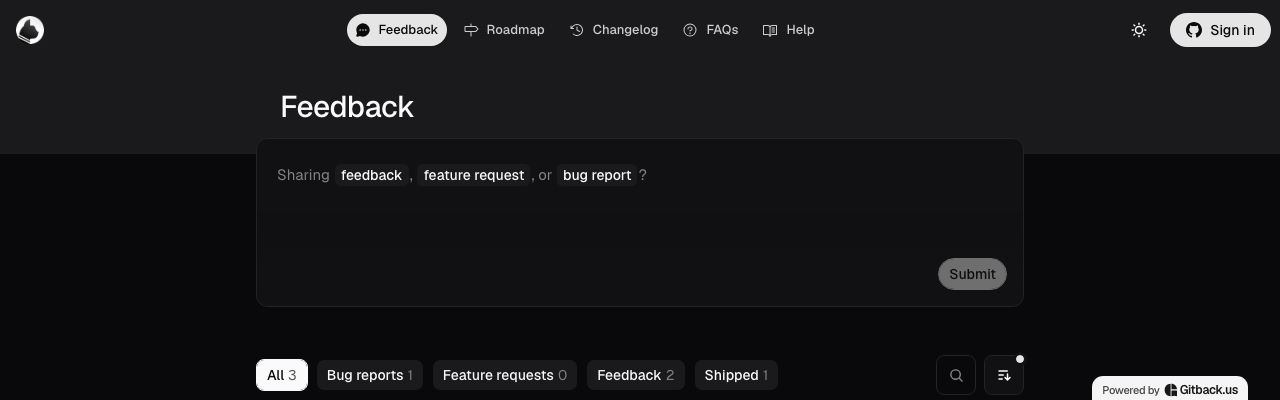
The composer asks whether the visitor is sharing feedback, a feature request or a bug report, and the tabs below filter the board by those kinds. A post is a Discussion in the repository, created with the poster's own GitHub token so GitHub records them as the author, and the vote count on it is the number of 👍 reactions from real GitHub accounts. The same Board has a roadmap and a changelog built from the repository's labels and Releases.
How does a feature request template fit with a Gitback Board?
The two work side by side. A request filed through your issue form is an Issue, and Gitback's Roadmap Module reads the repository's open Issues, so it appears there in the Open lane with no extra step. A Client, meaning a GitHub account with write access, can press Import to roadmap on it, which adds the roadmap: planned label and moves it to Planned. A request posted on the Board is a Discussion instead, and its votes are 👍 reactions on GitHub. The public roadmap guide explains the lanes.
What Gitback does not do: it does not read your issue form or enforce its fields, and a request posted on the Board is not filed through it. A Board post asks for a title and a body, and the visitor picks Bug report, Feature request or Feedback.
To try it, follow Open a Gitback Board for your repo and claim it or paste the repository's URL at Open a Board. Open-source repositories are free; private Boards are on the pricing page. More guides are in Guides.
Frequently asked questions
Does GitHub have a feature request template?
GitHub lets you add your own. You create an issue template or a YAML issue form under .github/ISSUE_TEMPLATE in the repository, or use Settings, then Set up templates under Issues. This guide has a feature request form ready to paste.
Where do I put a GitHub feature request issue template?
In a file under .github/ISSUE_TEMPLATE in the repository, for example .github/ISSUE_TEMPLATE/feature-request.yml, committed to the default branch. The template appears in the chooser once it is merged there.
Should a feature request template create an Issue or a Discussion?
An issue form creates an Issue, which suits a request concrete enough to act on. For open-ended ideas people should debate and upvote first, use a discussion category form in .github/DISCUSSION_TEMPLATE, or link the chooser to your Discussions with contact_links in config.yml.
Can GitHub issue forms add labels automatically?
Yes, with the labels key, but only for labels that already exist in the repository. A label that does not exist is not added, so create it first.
Is there an example feedback board on GitHub?
Gitsu's board at gitback.us/b/sahildave/gitsu is one. It is built live from the Gitsu repository's Discussions, Issues and Releases, and visitors can read it without signing in.